Basic Troubleshooting & System Status
NUDG has just recently been completely redesigned in this release,
and we have been working diligently to migrate legacy data over to the
new system. Given that NUDG is also in active development, you may
experience hiccups along the way. Please do not hesitate to let us know
if you run into any issues, notice any mistakes, or have any feature
requests and we will address them as we are able. You may contact us at support@nudgsystems.com
We will send out notices on any possible large changes that may impact your experience prior to implementation on your database.
BASIC TROUBLESHOOTING
Many issues can arise that are generally brought upon by browsers, whether you're using Firefox or Chrome for example.
A
simple refresh will generally fix MOST graphical issues or pages
struggling to load fully. However, sometimes you may need see wayward
Standards or Controls from the report screen, or maybe information that
you never filled in, but auto complete wants to. This is directly
related to your CACHE in your browser. If you start to see any of these
anomalies, the first thing we recommend is to clear your browser cache
for NUDG, and they should resolve.
We do
not recommend switching to LIST or Kanban view, if you do, be sure not
to save the changes or it sticks and the card view needs to manually be
switched back. If you do switch to list, a simple refresh or closing
your browser and returning should bring it back to card view. If you
want to immediately switch back to card view to card view hover over the
form title on the top left, click DISCARD Changes (Screen cap below)
For weaknesses/Control pop-up, the Quadrant "Quick Add" must not be open and ready for entry, or the pop out "add control/weakness" will not work. This is by design.
If you run across any issues that you are unable to resolve, you may put in a help request at support@nudgsystems.com and we will address it.
Same
applies for any requests, while we can't guarantee they will be done,
it's always good to get some feedback to control the direction of this
project.
Quadrant reports and adding controls/standards not selectable: Simply open the standard or control effected. Delete the current NUDG mapping (X) 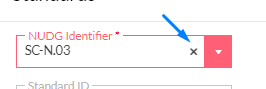
And then re-add the identifier exactly as it was without closing. Then click update and it should be selectable to add to the report.
Backups & Data Management
Backups are done once a week, Tuesday evening. If you wish to request a new backup data, simply let us know.
As
a reminder, CUI or sensitive data should not be stored in the system.
While the site is Encrypted, and the Datacenter is located in the U.S.,
it's best practice to keep your data in-house for anything that could
jeopardize security or any data you are responsible to secure.
Incoming Upgrades/Updates coming soon:

9-25-20 - NIST SP 800-53 Rev 5 to be added to Guidelines - Completed 11-5-20
9-3-20 - Audit Read only Accounts (upon request)
Current Issues/Reported Issues
11-5-20 - From CMMC Level 2 break down, RE-N.01 redirects to RE-N.02 Quadrant.
10-10-20 - IR-N.02 Edit function redirecting to IR-N.03 Quadrant when sorting by NIST-CUI - Completed 10-12-20
10-4-20 - IR-N.06 Control Column in Quadrant showing wrong columns on overall view (procedures instead of control name) - Completed 10-7-20
10-3-20 - Calendar from Quadrant (Tasks) not viewable to select year for scheduled dates 10-5-20
9-21-20 - Controls and Weaknesses unable to be tied to the report card/form - Completed 9-19-20
9-5-20 - Guidelines, graphical issue on initial display for IA-N.02 and CA-N.01 observed
8-28-20
- Quadrant pop out button for Control's Weakness infinite load. -
Work around, close pop out Window, refresh page, click button again.
Seems to be triggered when the Quadrant add button
inside the associated box (Control or Weakness) is selected prior to the
pop out button. - Completed 9-15-20
Updates and Changes
11-27-20 - CM-N.07, SI-N.01 and SC-N.18 Cards displayed NUDG identifier instead of CMMC number. CMMC Number now displayed.
11-23-20 - AC-N.06 S2 Standard. Deleted "portal" from "portal media".
AC-N.14 Added S2 Standard - Enforce secondary challenge or 2FA for remote access prior to granting access to VPN users.
Other changes:
CA-N.11 standard moved to CA-N.01 standard (S6). NIST NFO PL-2(3) was withdrawn and incorporated into PL-2 (NUDG CA-N.01).
NIST SP 800-53 revision 5 reference
PL-2(3) SYSTEM SECURITY AND PRIVACY PLANS | PLAN AND COORDINATE WITH OTHER ORGANIZATIONAL ENTITIES
[Withdrawn: Incorporated into PL-2.]
removed NUDG CA-N.11
NUDG CA-N.12 renamed NUDG CA-N.11
CM-N.11 standard moved to CM-N.01 standards (S3). NIST NFO CM-2(1) was withdrawn and incorporated into CM-2 (NUDG CM-N.01).
NIST SP 800-53 revision 5 reference
CM-2(1) BASELINE CONFIGURATION | REVIEWS AND UPDATES
[Withdrawn: Incorporated into CM-2.]
removed NUDG CM-N.11
NUDG CM-N.15 renamed NUDG CM-N.11
CM-N.14 standard moved to CM-N.04 standards (S4). NIST NFO CM-8(5) was withdrawn and incorporated into CM-8 (NUDG CM-N.04).
NIST SP 800-53 revision 5 reference
CM-8(5) SYSTEM COMPONENT INVENTORY | NO DUPLICATE ACCOUNTING OF COMPONENTS
[Withdrawn: Incorporated into CM-8.]
removed NUDG CM-N.14
RM-N.08 standard moved to RM-N.02 standards (S4). NIST NFO RA-5(1) was withdrawn and incorporated into RA-5 (NUDG RM-N.02).
NIST SP 800-53 revision 5 reference
RA-5(1) VULNERABILITY MONITORING AND SCANNING | UPDATE TOOL CAPABILITY
[Withdrawn: Incorporated into RA-5.]
removed NUDG RM-N.08
NUDG RM-N.09 renamed NUDG RM-N.08
MA-N.08 standard moved to MA-N.03 standards (S4). NIST NFO MA-4 (2) was withdrawn and incorporated into MA-1, MA-4 (NUDG MA-N.03).
NIST SP 800-53 revision 5 reference
MA-4 (2) NONLOCAL MAINTENANCE | DOCUMENT NONLOCAL MAINTENANCE
[Withdrawn: Incorporated into MA-1, MA-4.]
removed NUDG MA-N.08
Other notes:
NUDG MP-N.06 NIST SP 800-53 ref MP-7 (1) has been withdrawn and incorporated into MP-7 (NUDG MP-N.04).
NIST SP 800-53 revision 5 reference
MP-7 (1) MEDIA USE | PROHIBIT USE WITHOUT OWNER
[Withdrawn: Incorporated into MP-7.]
However, MP-N.06 has both a designated CMMC practice and NIST SP 800-171 requirement so this NUDG identifier has not been removed.
NUDG MP-N.08 NIST SP 800-53 reference MP-5 (4) has been withdrawn and incorported into SC-28(1). SC-28(1) has been added to MP-N.08 Guidelines as reference.
NIST SP 800-53 revision 5 reference
MP-5 (4) MEDIA TRANSPORT | CRYPTOGRAPHIC PROTECTION
[Withdrawn: Incorporated into SC-28(1).]
NIST SP 800-171 NFO control CA-3 (5) has been withdrawn and incorporated into SC-7 (5) (NUDG SC-N.09).
NIST SP 800-53 revision 5 reference
CA-3 (5) SYSTEM CONNECTIONS | RESTRICTIONS ON EXTERNAL SYSTEM CONNECTIONS
[Withdrawn: Moved to SC-7(5).]
11-6-20 - Controls and Weaknesses/Milestones will have field changes to show "Completion/Completed Dates" on the main quadrant for better overall view
Controls will have URL and hyper link functionality to reference uploaded resources documents, or outside tutorials for assistance on each control/identifier.
Controls order and presentation to be changed as well. Sample preview:
9-12-20 - Standard Changes - Completed 9-15-20
AC-N.08
S1: From: Identify and assign access to privileged accounts via roles.
To: Identify roles and their
associated access level. Assign users to roles and provide access to
resources based on their assigned role
S2: From: Separate privileged and non-privileged roles where applicable.
To: Provide descriptors/purpose
to roles and identifiers and signify whether a role is considered
privileged or non-privileged
AC-N.10
S1: From: Set system to automatically lock after 15 minutes of idle time.
To: Set system to automatically
lock after a defined period of time of which it was idle or not in-use
S2: Added: Enforce pattern hiding
displays during lockout to hide any information displayed on the device.
IA-N.07
S1: From: Obscure passwords when logging into organizational systems.
S2: To: Obscure
credentials where possible for login to systems. (ie: do not save user
names, do not show asterisks count matching password, characters hidden
while typing
password, etc).
9-8-20 - Roles adjusted/fields relocated and unnecessary fields removed - Completed 9-15-20
Future Plans that have been requested with/without an ETA:
Q3:
Layout changes to Roles - Completed 9-15-20
Full
incident response reporting DFARS Standards supported by NIST SP 800-61
and 800-84 - Guide to Test, Training, and Exercise Programs for IT
Plans and Capabilities - Completed 9-12-20
No ETA:
Software Inventory
MFA
CMMC Level 4 and 5
Whitelabeling Reports for MSP's
Related Articles
The Quadrant
The Quadrant is where you'll spend the majority of your time identifying, documenting, and tracking remediation for each identifier you intent to implement. Some of it has been filled out for you, but you are free to change, remove, add, and pretty ...Resources and Incident Response
Resources and Incident Response reports. Resources are simply a place to upload specific documentation you need to reference easily. Think, Visio diagrams, Acceptable Usage Policies, Cyber Security Training, Backup Reports. Pretty much anything you ...Users, Groups, & Roles
Users, Groups, & Roles, similar to Inventory and Partners, are optional but available in the system. You should be familiar with users and groups if you've ever worked with Active Directory. They are the most important part of your infrastructure ...NUDG Introduction
Welcome to NUDG Systems. This guide is meant to give you a brief overview of how we recommend starting your journey on cyber security compliance. While there's no right order to manage things, setting up the foundation correctly at the beginning can ...NIST SP 800-171
What is NIST SP 800-171? NIST SP 800-171 refers to the National Institute of Standards and Technology, and specifically the special publication 800-171. It's had multiple revisions over the years, and came as a surprise to small and mid size ...